HP Laptop Battery Repair Center in Nepal
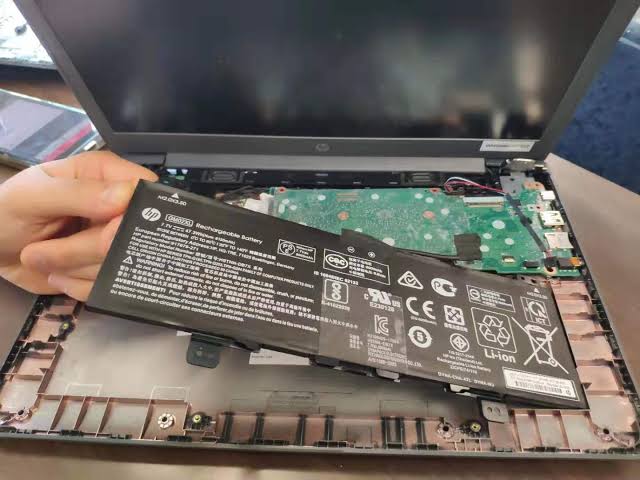
Is your HP Chromebook not charging, losing battery life quickly, or shutting down unexpectedly? If you're searching for a reliable HP Chromebook battery repair and replacement service in Kathmandu, Guru Computer Solution is here to help.
Our experienced technicians perform a thorough battery and power system diagnosis to identify the exact cause of the problem, whether it's a worn-out battery, charging circuit fault, damaged charging port, or software-related power issue. Using professional diagnostic tools and premium-quality replacement components, we provide dependable battery repair and replacement services designed to restore your Chromebook's battery performance, charging efficiency, and everyday reliability with minimal downtime.
Common Signs Your HP Chromebook Battery May Need Replacement
If your HP Chromebook is showing any of the following symptoms, it may be time to have the battery professionally inspected or replaced:
- Shortened Battery Runtime
- Rapid Battery Drain
- Frequent Charging Required
- Chromebook Shuts Down Unexpectedly
- Battery Not Charging
- Battery Not Detected
- Slow or Intermittent Charging
- Inaccurate Battery Percentage
- Chromebook Only Works While Plugged In
- Battery Overheating
- Swollen or Bulging Battery
- ChromeOS Battery Health Warnings
- Reduced Overall System Performance
- Unexpected Power Loss During Use
- Battery Failure Due to Age or Heavy Usage
Premium Care for Your HP Chromebook Battery
Your HP Chromebook deserves professional attention that reflects its reliability and everyday importance. At Guru Computer Solution, we combine technical expertise with exceptional customer service to deliver repair solutions that meet the highest standards of quality and performance.
Every battery repair begins with a comprehensive inspection to determine the exact cause of the issue. Our experienced technicians utilize advanced diagnostic technology and carefully selected replacement components to restore dependable battery life, stable charging performance, and long-term reliability.
With a commitment to precision workmanship, honest recommendations, and customer satisfaction, Guru Computer Solution has become a trusted destination for professional HP Chromebook battery repair and servicing.
Why Go for Guru Computer Solution to Repair HP Laptop Battery?
At Guru Computer Solution, we are committed to providing reliable repair solutions, exceptional workmanship, and outstanding customer service. Whether your HP Chromebook needs a battery replacement or a complete power system diagnosis, our experienced technicians ensure every repair is completed with precision and care.
Why Customers Trust Us
- Specialized Expertise in HP Chromebook Repair
- Accurate Battery & Charging System Diagnostics
- Premium-Quality Replacement Batteries
- Professional ChromeOS Troubleshooting
- Experienced & Certified Repair Technicians
- Fast Turnaround to Minimize Downtime
- Comprehensive Quality Testing Before Delivery
- Transparent Repair Recommendations
- Competitive & Affordable Pricing
- Customer-Focused Service Experience
Every HP Chromebook battery repair begins with a detailed inspection to identify the exact cause of the problem. Our technicians carefully evaluate the battery, charging port, power management system, and ChromeOS performance before recommending the most effective repair solution. Using advanced diagnostic equipment and premium-quality replacement components, we restore dependable battery life, stable charging performance, and reliable everyday operation.
Whether your Chromebook is used for education, remote work, business, or personal computing, Guru Computer Solution delivers professional battery repair services you can rely on. Our commitment to quality, technical excellence, and customer satisfaction makes us a trusted choice for HP Chromebook battery repair and servicing in Kathmandu.
Frequently Asked Questions
Common signs include rapid battery drain, the laptop only working while plugged in, slow or no charging, unexpected shutdowns, battery health warnings, overheating, or a swollen battery.
In most cases, defective or worn-out laptop batteries are replaced rather than repaired. However, if the issue is related to the charging port, power circuit, or software, a replacement battery may not be necessary. A professional diagnosis will determine the correct solution.
The repair time depends on the laptop model and the availability of replacement parts. Many battery replacements can be completed on the same day, while some models may require additional time.
No. Battery replacement does not normally affect the data stored on your laptop. However, it is always recommended to back up important files before any repair service.
The problem may be caused by a faulty charger, damaged charging port, motherboard power circuit, or software-related issue rather than the battery itself. A complete diagnostic can identify the exact cause.
Laptop batteries naturally lose capacity over time due to repeated charge cycles. High temperatures, frequent full discharges, using incompatible chargers, and heavy daily usage can also shorten battery lifespan.
Most laptop batteries last between 2 and 5 years, depending on usage, charging habits, and the number of charge cycles completed.
Yes. We use premium-quality replacement batteries that are designed to meet compatibility, safety, and performance standards for your specific laptop model.
Yes. A swollen battery should be replaced immediately because it can damage internal components and may become a safety hazard if left untreated.
Yes. Outdated drivers, operating system errors, excessive background applications, firmware issues, or incorrect power settings can affect battery performance and charging behavior.
Appointments are recommended but not always required. You can contact us in advance to check technician availability and replacement battery stock.
Yes. Warranty coverage is available on replacement batteries and repair services. The warranty period depends on the battery model and the replacement component used.
You can improve battery lifespan by avoiding excessive heat, using the original charger, keeping software updated, maintaining moderate charge levels, and avoiding unnecessary full discharge cycles.
If your battery drains unusually fast, have the battery health, charging system, and software checked by a professional technician. The issue may be caused by battery wear, background applications, or hardware faults.
Absolutely. Every laptop undergoes a complete battery and charging system diagnostic to identify the exact cause of the issue before any repair or replacement is recommended.
