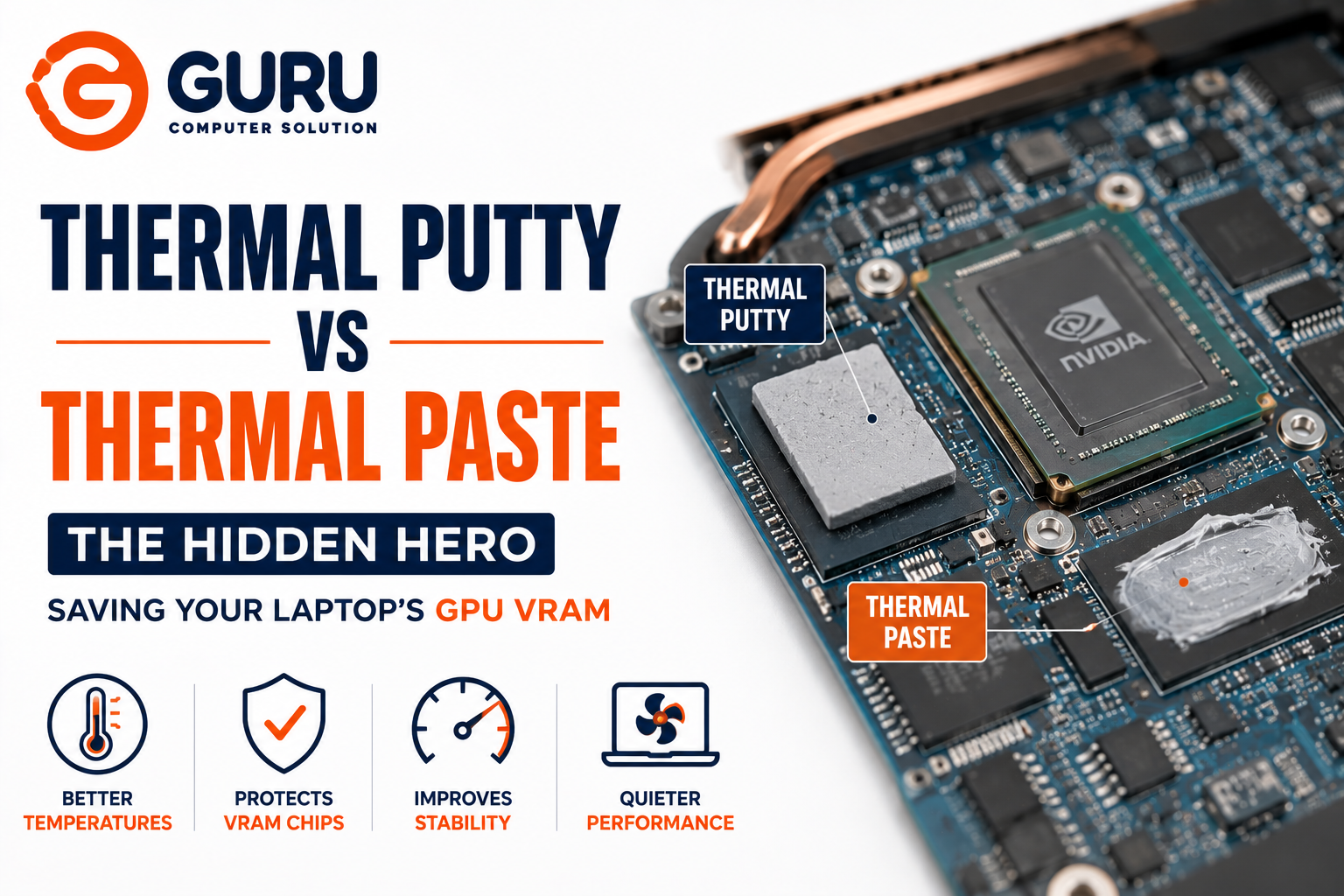
Most people know their laptop's CPU and GPU need thermal paste. Almost nobody knows that a completely different material, thermal putty is quietly protecting components that are just as capable of causing an overheating laptop when neglected. Understanding the difference between these two thermal interface materials is the difference between a proper repair and one that leaves half the problem untouched.
What Is the Difference Between Thermal Putty and Thermal Paste?
Both are thermal interface materials (TIMs), substances that fill the microscopic gaps between a chip and its heatsink, since even a flat-looking surface has tiny irregularities that trap insulating air if left unfilled. The core difference comes down to consistency and what each is built to handle.
Thermal paste is thin and spreadable, designed for direct, flat, tightly-clamped contact which is the kind of connection a CPU or GPU die has with its heatsink. Thermal putty is thicker, denser, and moldable, designed to bridge larger and uneven gaps that thermal paste simply isn't built to fill. This distinction drives everything else about where and how each one is actually used inside a laptop.
What Is Thermal Putty and Where Is It Used Inside a Laptop?
Thermal putty is often described as a "liquid thermal pad" which is a soft, hand-moldable compound that conforms to gaps of varying and uneven height, then holds its shape under clamping pressure rather than spreading thin like paste does.
Inside a laptop, thermal putty is most commonly used on:
- GPU VRAM chips (GDDR6/GDDR6X memory modules), these sit at a different height than the GPU die itself, and putty's ability to fill that height difference is exactly what makes it suited here instead of paste
- VRM (voltage regulator module) components, these are the power delivery stages that generate real heat but sit unevenly across the board relative to the main heatsink contact
- Controller chips and other secondary hot components that thermal pads traditionally covered, before putty became a common, more effective alternative
Thermal putty essentially replaces thermal pads in these locations. Historically, laptop manufacturers used solid rubber-like pads of a fixed thickness for VRAM and VRM, but pads only work well if their thickness exactly matches the gap, which varies between models and even between manufacturing batches of the same model.
What Is Thermal Paste and Why Is It Important?
Thermal paste is the more familiar material — a thin, spreadable compound applied directly to the CPU or GPU die before the heatsink is mounted and clamped down. Because the CPU/GPU die is a single, flat, tightly-controlled contact surface, paste's thin-film properties are exactly what's needed there: minimal thickness for maximum heat transfer, applied under firm, even clamping pressure.
Thermal paste degrades over time and the compound gradually dries out and loses effectiveness, typically over roughly 2-4 years of normal use, which is why periodic thermal paste replacement is a standard part of laptop maintenance, independent of any putty considerations.
Why GPU VRAM and VRM Cooling Matter More Than Most People Realize
CPU and GPU thermal paste gets most of the attention, but VRAM and VRM run hot enough to cause real problems if their cooling is neglected or poorly matched.
GPU VRAM specifically handles the constant, high-speed data transfer that graphics-intensive tasks demand like gaming, rendering, video editing and generates meaningful heat doing so, especially under sustained load. Overheating VRAM doesn't always show up as an obvious crash; it can manifest as graphical artifacts, texture corruption, or unexplained instability specifically during graphics-heavy tasks, symptoms that get misdiagnosed as a driver or software issue far more often than they should.
VRM components manage power delivery to the GPU (and CPU) and if they run too hot, the entire system may throttle performance or become unstable to protect itself, even if the GPU die itself is running at a perfectly normal temperature. A gaming laptop that's throttling despite reasonable GPU temperatures is a classic sign that VRM cooling, not the GPU itself, deserves a closer look.
Thermal Putty vs Thermal Paste: Key Differences Explained
Consistency: Paste is thin and spreadable; putty is thick and moldable, holding its shape rather than flowing.
Gap-filling ability: Paste is designed for tight, flat, uniform contact; putty is designed specifically to bridge larger and uneven gaps that vary in height across a board.
Typical application area: Paste goes on the CPU/GPU die directly; putty goes on VRAM, VRM, and other secondary components sitting at different heights nearby.
Longevity: Paste dries out over a few years and needs periodic replacement; quality thermal putty is generally formulated not to dry out over the life of the device, since it isn't spread as thin and doesn't rely on the same evaporative solvents.
Electrical safety: Both are typically formulated to be non-conductive for use near sensitive electronics, but this should always be confirmed on the specific product before application, since some high-performance paste variants (liquid metal, for example) are conductive and unsuitable for use anywhere near exposed circuitry.
Why Using the Wrong Thermal Material Can Damage Your Laptop
Using paste where putty is needed means the thin compound can't bridge the actual gap between the VRAM chip and the heatsink, leaving an air gap that insulates rather than transfers heat, largely defeating the purpose of applying anything at all.
Using putty where paste is needed on a CPU/GPU die can leave a layer that's thicker than optimal for that specific flat, tightly-clamped contact, potentially reducing heat transfer efficiency compared to properly applied paste.
Using conductive material near exposed components risks an electrical short if any excess material makes contact with nearby circuitry, which is a real risk with liquid metal-style compounds in particular, and part of why non-conductive material is specifically recommended for GPU and VRAM applications.
The cumulative effect of any of these mismatches is the same underlying problem: heat that should be transferring away from a chip stays trapped instead, leading to elevated operating temperatures, potential throttling, and accelerated wear on the affected component over time.
Signs Your Laptop Needs Thermal Paste or Thermal Putty Replacement
- Rising temperatures under load compared to when the laptop was newer, even with clean vents and fans
- GPU-specific symptoms like graphical artifacts, texture glitches, or crashes specifically during graphics-intensive tasks that point toward VRAM rather than general CPU overheating
- Performance throttling despite the GPU die itself reporting reasonable temperatures, suggesting VRM-side heat rather than the GPU core
- Fan noise increases without a corresponding increase in workload, as the system compensates for reduced cooling efficiency
- A laptop that's 2+ years old and hasn't had thermal maintenance, especially one used for sustained gaming or creative workloads
How Guru Computer Solution Professionally Replaces Thermal Paste and Thermal Putty
Our thermal maintenance service treats these as genuinely separate materials requiring separate expertise, not a single generic "repaste" service:
- Full disassembly to access the CPU, GPU, VRAM, and VRM components directly
- Assessment of existing material condition on each component separately, since paste and putty degrade differently and don't necessarily need replacement on the same schedule
- Proper thermal paste application on the CPU and GPU die, using quality compound suited to the specific chip and clamping design
- Correct thermal putty application on VRAM and VRM components, matched to the actual gap height rather than assuming a one-size-fits-all thickness
- Reassembly and load testing to confirm both temperature and stability improvements before the laptop is returned
How Often Should Thermal Paste and Thermal Putty Be Replaced?
Thermal paste typically benefits from replacement every 2-4 years for regular use, or somewhat more frequently for gaming laptops under sustained heavy load, since paste dries out and loses effectiveness over time regardless of how well the rest of the system is maintained.
Thermal putty, by contrast, is generally formulated to last significantly longer without degrading, since it isn't applied as a thin evaporative film — many quality putty products are rated not to dry out over the practical service life of the laptop. This means putty often doesn't need replacement on the same schedule as paste, though it's worth inspecting during any major thermal service in case of physical damage, contamination, or an initial poor-quality application.
Keep Your Laptop Cool with Expert Thermal Maintenance from Guru Computer Solution
Overheating that persists after a basic cleaning often means the thermal interface materials themselves — not just accumulated dust — need attention. Getting the right material on the right component is what separates thermal maintenance that actually solves the problem from a service that only addresses half of it.
Frequently Asked Questions
What Is the Difference Between Thermal Putty and Thermal Paste?
Thermal paste is a thin, spreadable compound designed for flat, tightly-clamped contact like a CPU or GPU die. Thermal putty is a thicker, moldable compound designed to bridge larger, uneven gaps, commonly used on VRAM and VRM components.
Can Thermal Paste Replace Thermal Putty?
Not effectively in most cases. Because VRAM and VRM sit at different heights than the main die, thermal paste's thin consistency generally can't bridge that gap the way putty's thicker, moldable body can, though some technicians do use very carefully applied paste in a pinch due to which putty remains the better-suited material for these specific components.
Where Is Thermal Putty Used in a Laptop?
Primarily on GPU VRAM chips, VRM power delivery components, and other secondary hot components that sit at a different height than the CPU/GPU die relative to the heatsink.
Why Does GPU VRAM Need Thermal Putty?
VRAM chips generate real heat during graphics-intensive tasks and typically sit at a different physical height than the GPU itself. The putty's ability to confirm to and fill that height difference is what allows effective heat transfer to the heatsink.
How Do I Know If My Thermal Paste Has Dried Out?
Rising CPU or GPU temperatures under load compared to when the laptop was newer, increased fan noise for the same workload, and performance throttling are the most common indicators, particularly on a laptop that's a few years old and hasn't had thermal maintenance.
Does Thermal Putty Wear Out Over Time?
Less than thermal paste does. Quality thermal putty is typically formulated not to dry out over the laptop's practical service life, though physical damage or a poor initial application can still affect its performance.
Can Old Thermal Paste Cause Laptop Overheating?
Yes. As thermal paste dries out, its ability to transfer heat away from the CPU or GPU die decreases, which can cause rising temperatures and throttling even when the rest of the cooling system (fans, vents, heatsink) is clean and functioning normally.
Should I Replace Thermal Paste and Thermal Putty Together?
Not necessarily on the same schedule, since they degrade at different rates. However, if a laptop is already fully disassembled for thermal paste replacement, it's efficient to inspect and, if needed, address the putty on VRAM/VRM at the same time.
Can I Replace Thermal Paste or Thermal Putty Myself?
It's possible for those comfortable with laptop disassembly, but the risk of using the wrong material, applying incorrect thickness, or damaging delicate components during disassembly is real. This is a common area where a DIY attempt on the wrong material (paste instead of putty, or vice versa) leads to less improvement than expected.
How Often Should Thermal Paste and Thermal Putty Be Replaced?
Thermal paste should be replaced roughly every 2-4 years depending on usage intensity; thermal putty far less frequently, since it's generally formulated to last significantly longer without degrading.
What Happens If the Wrong Thermal Material Is Used?
Reduced heat transfer efficiency at minimum, since an ill-suited material may not properly fill the actual gap between component and heatsink — potentially leading to elevated temperatures, throttling, or accelerated wear on the affected component over time.
Which Laptop Brands Benefit Most from Thermal Maintenance?
Gaming-focused laptops generally benefit most given their sustained higher thermal loads, this includes ASUS gaming laptops, MSI models, Acer Predator, Lenovo Legion, HP Omen, and Dell G Series machines. Apple MacBooks, while not marketed as gaming devices, can also benefit from thermal maintenance under sustained creative or compute-heavy workloads.
Why Choose Guru Computer Solution for Thermal Paste and Thermal Putty Replacement?
We treat thermal paste and thermal putty as genuinely different materials requiring different application approaches, rather than a single generic repaste service ensuring both your CPU/GPU and your VRAM/VRM get the cooling treatment each actually needs.






