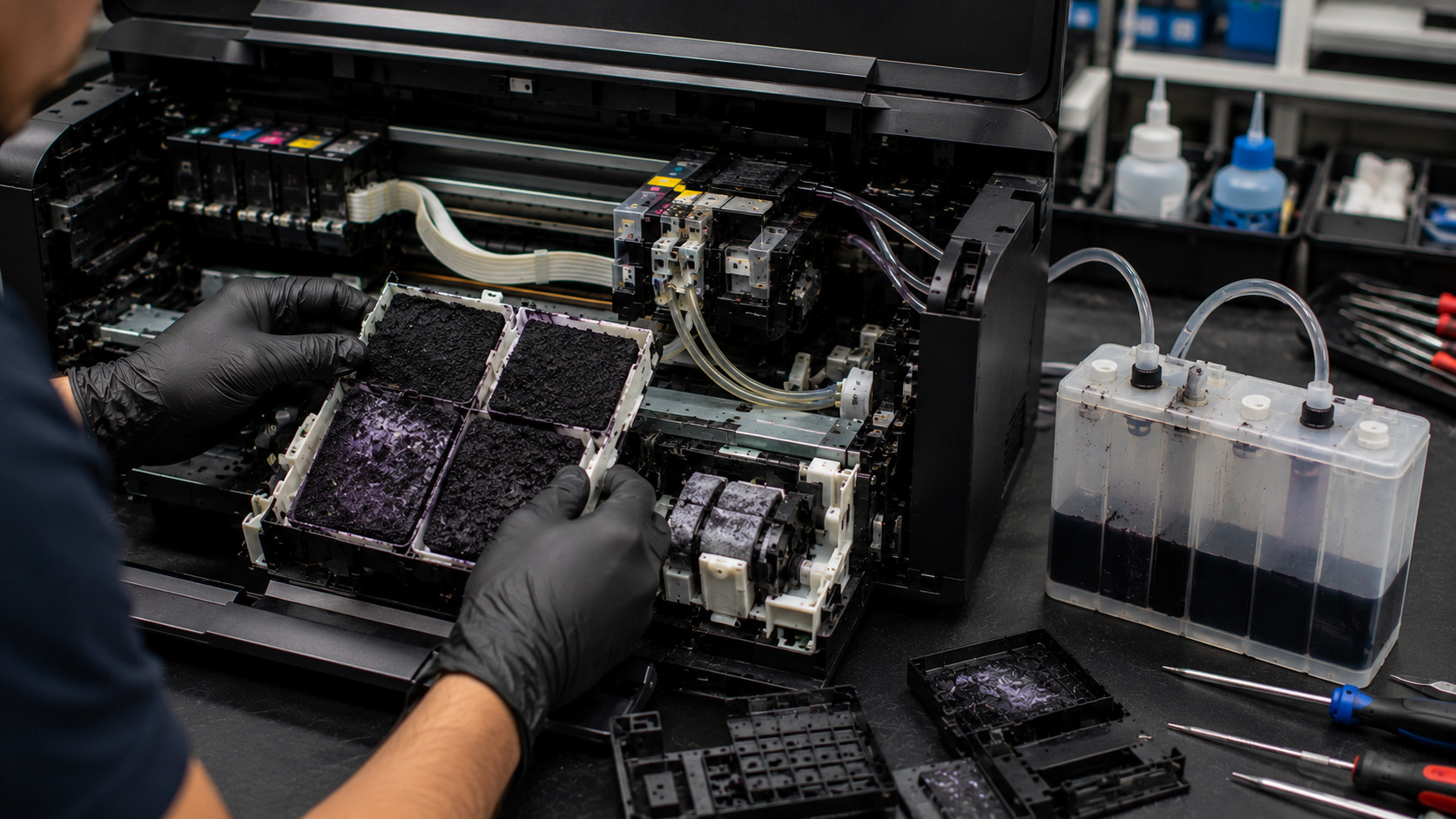
Every inkjet printer generates waste ink during printhead cleaning, nozzle maintenance, and startup procedures. To prevent this excess ink from leaking inside the printer, manufacturers use waste ink collection systems that store the ink in absorbent pads or external waste ink tanks. Over time, these systems become saturated and can trigger maintenance warnings or even stop the printer from operating. Understanding how waste ink systems work can help users maintain their printers properly, avoid ink leaks, and prevent unexpected downtime.
What problem is the customer facing?
Users may experience:
- "Waste Ink Pad Full" errors
- "Service Required" messages
- Printer refusing to print
- Ink leaking inside the printer
- Excessive ink buildup
- Unexpected printer shutdowns
- Maintenance counter warnings
- Reduced printer functionality
These issues often appear after years of normal printer operation.
Why Does It Happen?
1. Printhead Cleaning Cycles
Printers regularly clean the printhead to prevent clogged nozzles, generating waste ink.
2. Automatic Maintenance Procedures
Startup and shutdown maintenance routines consume ink that must be collected.
3. Waste Ink Pad Saturation
Internal absorbent pads eventually reach their storage capacity.
4. High Printing Volume
Frequent printing creates more waste ink over time.
5. Excessive Cleaning Operations
Repeated cleaning cycles can rapidly fill waste ink systems.
6. Aging Components
Older waste ink pads lose their ability to absorb and retain ink efficiently.
How can customers identify the issue?
Common Warning Signs
- Waste ink pad full errors
- Service required notifications
- Printer stops printing unexpectedly
- Frequent maintenance warnings
- Ink stains around the printer
Performance Symptoms
- Printer refuses to initialize
- Printing interruptions
- Maintenance functions fail
- Reduced reliability
Visual Signs
- Saturated waste ink pads
- Ink accumulation inside the printer
- Overflow near maintenance stations
- Ink residue around tubing and collection areas
Understanding Waste Ink Systems
Internal Waste Ink Pads
Most consumer inkjet printers use absorbent waste ink pads located inside the chassis. These pads collect and store excess ink generated during cleaning operations.
External Waste Ink Tanks
Many high-volume printers and modified systems use external waste ink tanks connected through tubing. These tanks make maintenance easier because ink levels can be monitored and emptied when necessary.
Waste Ink Counters
Most modern printers track waste ink accumulation using software counters. Once the estimated capacity is reached, the printer may stop working until maintenance is performed and the counter is reset.
Possible solutions.
Inspect the Waste Ink System
Check for leaks, overflow, or saturated waste ink pads.
Replace Waste Ink Pads
Install new pads when the originals reach capacity.
Clean Excess Ink
Remove accumulated waste ink from maintenance areas.
Reset the Waste Ink Counter
After servicing, reset the maintenance counter using approved procedures.
Upgrade to an External Tank
High-volume users may benefit from an external waste ink collection system.
Schedule Preventive Maintenance
Regular inspections help prevent overflow and costly repairs.
Why Choose Guru Computer Solution?
1.Certified Technicians
Experienced in inkjet printer maintenance and waste ink system repairs.
2.Genuine Parts
Quality replacement waste ink pads and maintenance components.
3.Fast Turnaround
Quick diagnostics and servicing to minimize downtime.
4.Warranty Support
Repairs backed by service warranty.
5.Affordable Pricing
Professional printer maintenance at competitive rates.
Conclusion
Waste ink systems are an essential part of every inkjet printer, collecting excess ink generated during cleaning and maintenance operations. Whether your printer uses internal waste ink pads or an external waste ink tank, these components eventually require servicing to prevent overflow, leakage, and printer downtime. Regular maintenance and timely replacement of saturated components can help extend printer life and maintain reliable performance.
If your printer is displaying waste ink errors, service warnings, or signs of ink leakage, Guru Computer Solution can provide professional diagnostics, waste ink pad replacement, waste ink counter resets, and printer repair services to keep your printer operating efficiently.





